

Change CR Item object status based on CR header status change
Overview
Change items in the change record process represent the objects impacted by the current change management process. Therefore, it is important that as soon as the change process is completed, the status of the corresponding change items (whose change relevancy is “Created” or “Changed”) is updated to reflect the implementation of this change in the production sites/plants. Currently, this is handled through a background jobs by some customers, and few others manage it manually. The manual process is error-prone and does not guarantee that the task is completed on time. On the other hand, the background job can cause delays until the next job run. Keeping these challenges in mind, it is important to update the status of the change items in alignment with the change record header status and other item attributes to ensure that the change objects status is consistent with the change management process.
Generate BRF+ Application:
Pre-Requisite:
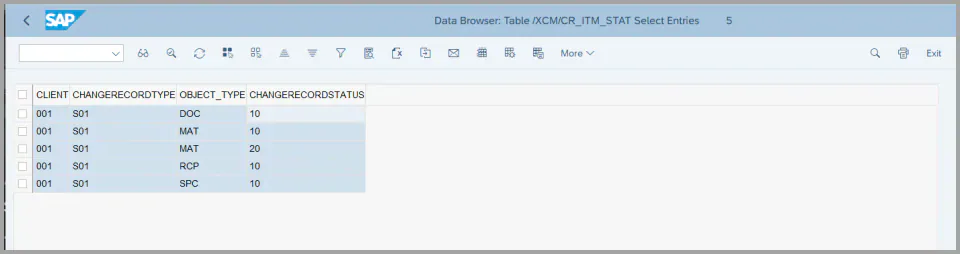
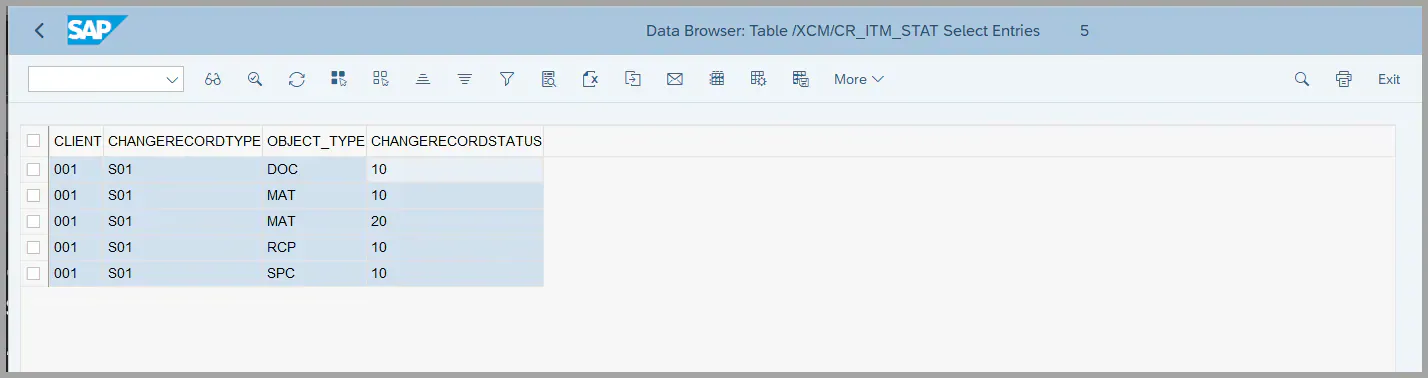
- To avoid performance issues during Change Record (CR) header status updates, it is recommended to maintain the configuration table
/XCM/CR_ITM_STATwith the necessary entries, refer to the IMG Customization for steps to maintain entries. - For each Change Record Type, the associated Object Type must be linked to the relevant header status that should trigger an item status update.
- For example, as shown in the screenshot below, the Material object’s status change is only applicable when the CR header reaches status 20.
- In all other header statuses, the BRF+ logic for determining the Material’s target status is not executed, thereby optimizing system performance.
Generating the BRF+ Application:
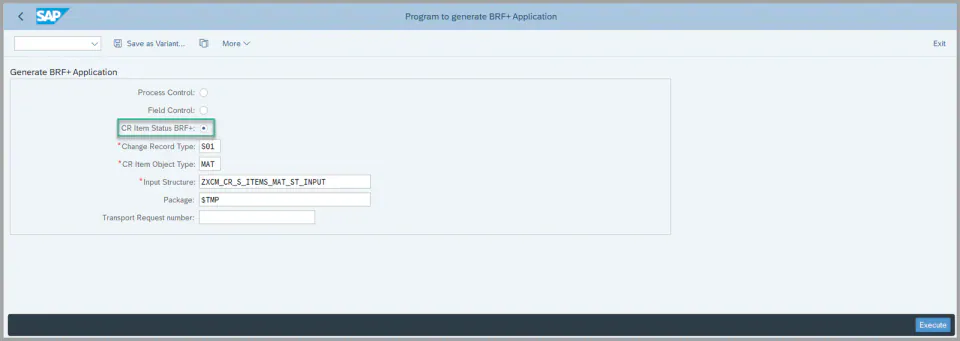
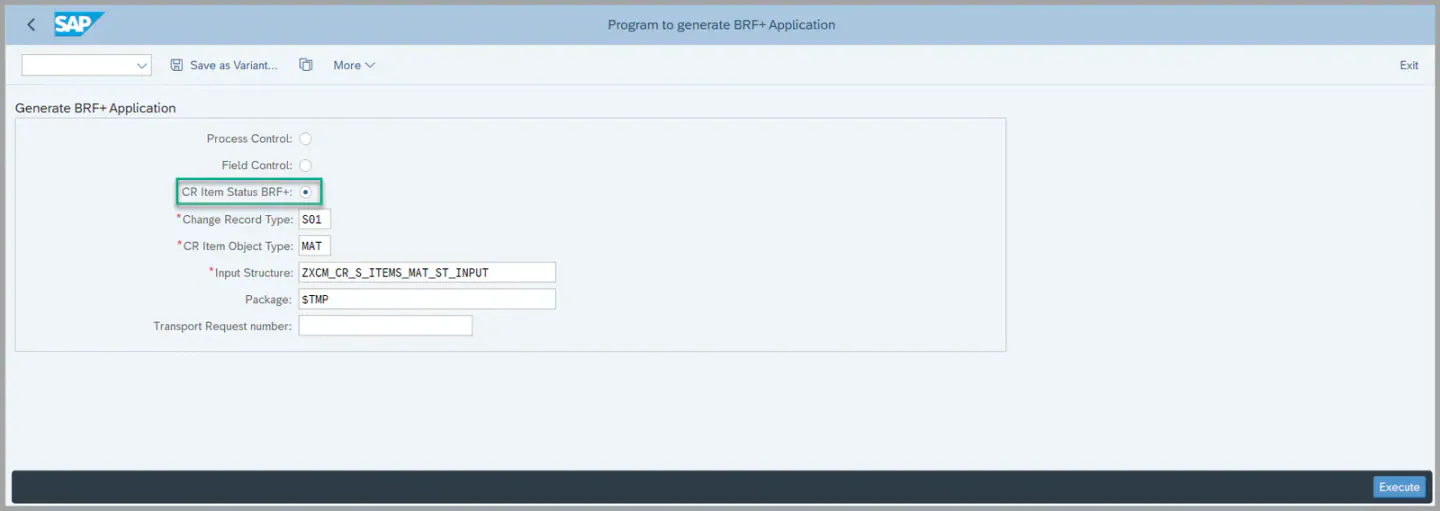
To generate the BRF+ application, execute the report /XCM/BRF_GENERATE via transaction SE38, and follow these steps:
-
Enter the required input values:
- Select the “CR Item Status BRF+” radio button.
- Specify the Change Record Type and the Object Type for which the BRF+ decision table should be created.
- Provide the correct Input Structure for the BRF+ Decision Table (e.g., use the appropriate structure for object type MAT).
- Enter the Package name. If you are using a local package, a transport request number is not required, however, this is not recommended, please use package and include to the Transport Request to transport to production system
-
Execute the report by clicking Execute.
-
Post-execution results:
- A BRF+ Application and the corresponding Decision Table will be generated.
- If this is the first time generating a BRF+ configuration for the specified Change Record Type, both a new application and a decision table will be created.
- If an application already exists for the given Change Record Type, only a new Decision Table will be added for the specified Object Type; the application itself will not be duplicated.
Maintaining the BRF+ Decision Table:
After generating the BRF+ application in the previous step, navigate to the BRF+ Workbench to configure the decision logic:
-
Open the BRF+ Workbench and find the application that was just generated.
-
Within the application, access the Decision Table associated with the relevant Object Type.
-
Maintain the required conditions under which the item status should be updated. These conditions are typically based on:
- Change Record Type
- Change Record Header Status
- Target Item Status
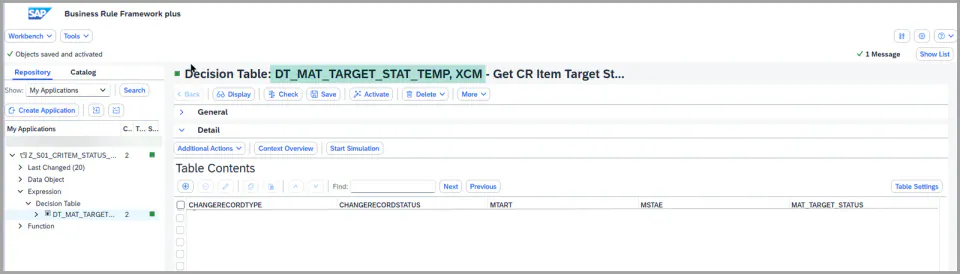
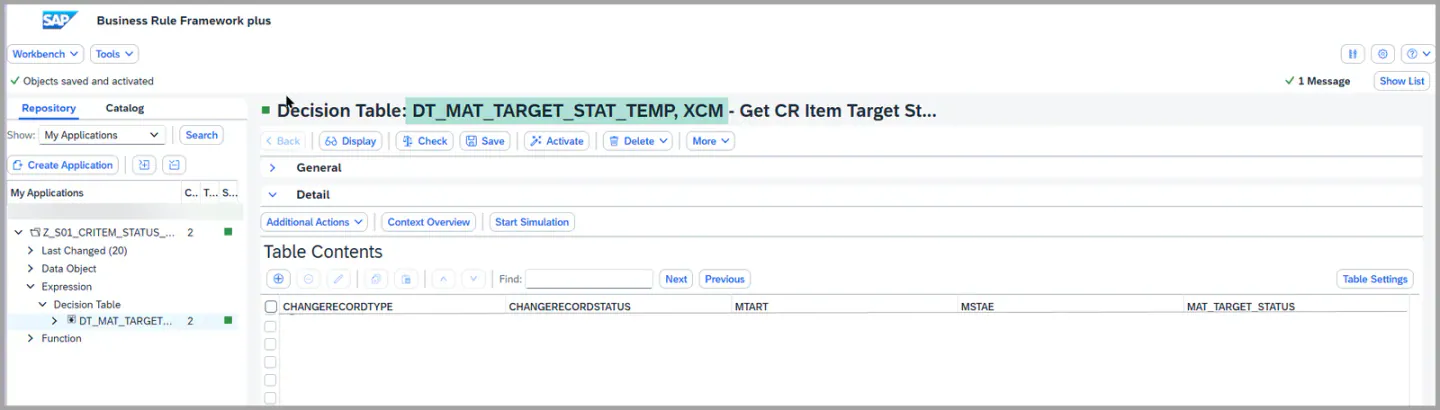
- Define the logic according to your specific business requirements. The decision table will use these inputs to determine the appropriate item status during the change management process.
- For more detailed configuration guidance, please refer to the BRF Customization
XCM BAdI Usage
Enhancement Spot /XCM/CR_ES_ITEM_OBJECT_STATUS
/XCM/CR_EX_ITEM_OBJECT_STATUS
BAdI /XCM/CR_EX_CR_ITEM_STAT_EMAIL
Interface /XCM/CR_IF_CR_ITEM_STAT_EMAIL
Description: The notification that is sent when the item object status changes can be adjusted by an own implementation, where the delivered subject and text do not meet the requirement.
The method MODIFY_EMAIL_CONTENT supplies the importance, the subject, the recipient list and the mail body, and each of them can be changed by the implementation.
A recipient is maintained with the flags for express, copy, blind copy and no forwarding, so distribution lists and copy recipients can be added in addition to the recipients determined by XCM.
Signature for reference:
types: BEGIN OF recipient,
         recipient  TYPE REF TO if_recipient_bcs,
         express    TYPE boolean,
         copy       TYPE boolean,
         blind_copy TYPE boolean,
         no_forward TYPE boolean,
       END OF recipient .
types: recipients TYPE STANDARD TABLE OF recipient .

methods MODIFY_EMAIL_CONTENT
  changing
    !IMPORTANCE type BCS_DOCIMP
    !SUBJECT    type STRING
    !RECIPIENTS type RECIPIENTS
    !EMAIL_BODY type SOLI_TAB .
Enhancement Spot /XCM/CR_ES_ITEM_OBJECT_STATUS
BAdI /XCM/CR_EX_ITEM_OBJECT_STATUS
Interface /XCM/CR_IF_ITEM_OBJECT_STATUS
This is the exit that performs the status change on the item object itself.
Description: The status change on the item object is carried out by an implementation per object type. Where an object type is used that XCM does not cover, the status change is supplied by an own implementation.
The method SET_STATUS receives the change record header and the header extension, and the object ID of the item whose status is to be changed.
The implementation sets the status on the object and reports the outcome back through MESSAGE_LIST and SEVERITY. The severity returned decides how the process reacts, so a status change that could not be carried out is reported here rather than being ignored.
This allows the status of an own object type to follow the change record header status in the same way as the object types delivered with XCM.
Signature for reference:
methods SET_STATUS
  importing
    !CHANGE_RECORD_HEADER     type /IAM/S_I_ROOT
    !CHANGE_RECORD_HEADER_EXT type /PLMI/S_I_CR_HDR_EXT optional
  changing
    !OBJECT_ID    type STRING
    !MESSAGE_LIST type /PLMB/T_SPI_MSG
    !SEVERITY     type /XCM/PR_ERROR_ACTION_SEV .
See Also
IMG Customization
BRF Customization
Keywords
CR Item status, BRF+, Change record type, Item status
Prerequisites
- Before Generating the BRF+ make sure that the table entries are maintained refer to the IMG Customization. then Proceed with executing the report Program and generating the BRF+ application.