

PLM CR Integration with SAP MDG-M
Overview
MDG-M:
- SAP MDG-M (Master Data Governance for Material) centralizes the creation, management, and distribution of material master data to ensure accuracy, consistency, and compliance across systems.
- With validation rules, duplicate checks, and approval workflows, it enhances data quality and efficiency.
- Its seamless integration with SAP and non-SAP systems standardizes material information, reduces redundancy, and supports analytics, supply chain operations, and digital transformation.
Integration:
- SAP MDG-M and SAP PLM Change Record work together to synchronize engineering-driven changes (from PLM) with business and operational master data (in MDG).
- When an engineering change in SAP PLM requires new or updated material data, a S/4HANA change record can trigger or link to an MDG material change request (MDG-M CR).
- This ensures that material master updates, like new material creation, description updates, or Material Classification update, follow a governed, auditable process and are distributed consistently across ERP and other systems.
Key Advantages:
- Eliminates manual re-entry of material information, reducing errors and mismatched data between ERP and MDG-M
- Combines PLM’s engineering change control with MDG’s data governance, ensuring all changes go through standard workflows, approvals, and validations
- Provides complete visibility of material master changes, linking every ERP update to its originating engineering change record for full auditability.
Integration setup Between PLM Change Record and MDG-M
- MDG-M Change Requests (CRs) are automatically created by XCM for all materials or placeholders with create relevance added to the Change Record.
- This creation depends on the assigned relevance, for example, if the relevance is “Reference”, no MDG-M CR will be created.
To enable automatic MDG-M CR creation, the following customizations must be performed:
1. Configure the MDG-M Task in BRF+
- XCM delivers a predefined background task named
MDG-M_CR_CREATE. - Maintain this task in the BRF+ Decision Table – GET_TASKS for the appropriate Change Record status, as shown in the screenshot below.
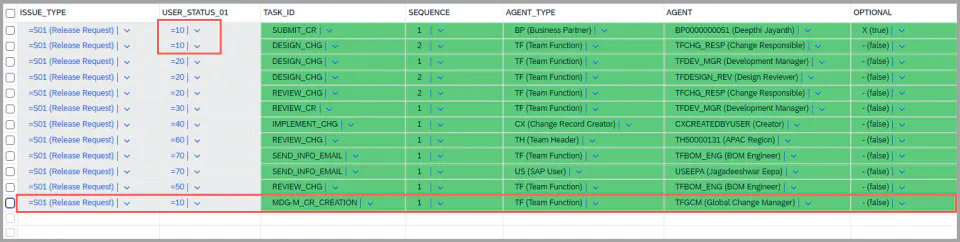
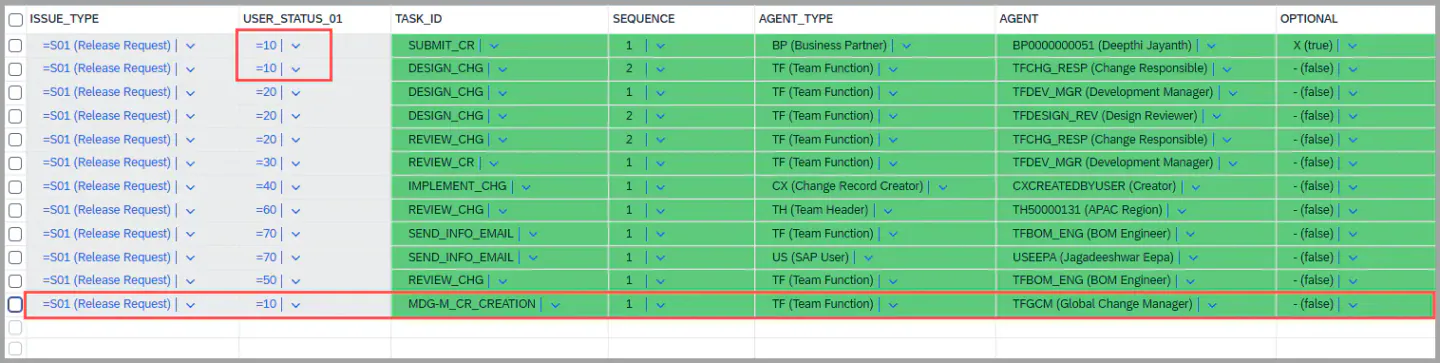
-
Please refer to the link - IMG Customization to create task id.
-
This entry determines when and how the MDG-M task is created within the workflow.
-
The MDG-M task must be configured for one specific status only.
- For example, if the task is to be triggered at Status 45, it should not be configured for any other status.
-
This setup ensures proper control and prevents duplicate task creation during the Change Record approval process.
-
You may also configure additional tasks relevant to this status as per your business process needs.
2. MDG-M Admin Task
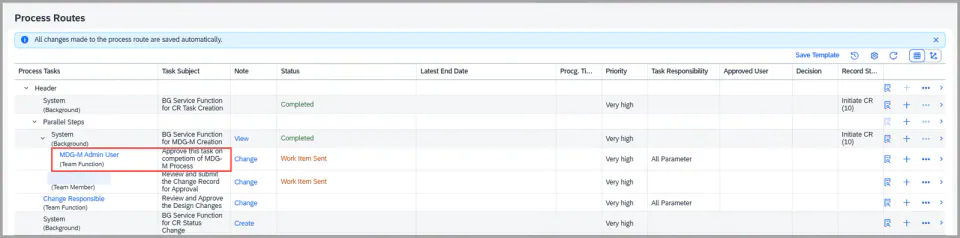
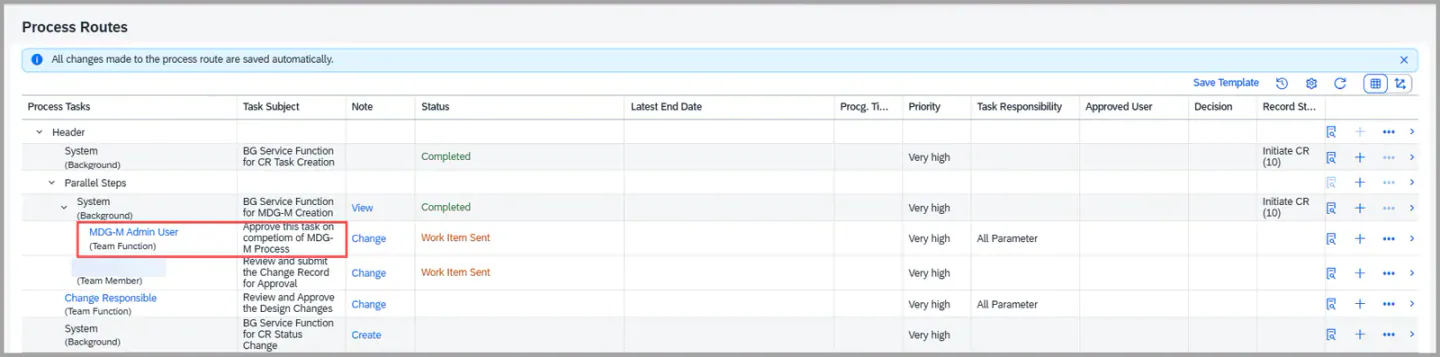
- During workflow execution, when the background task
MDG-M_CR_CREATEruns, it checks for any existing MDG-M CRs. - If MDG-M CRs are found, the corresponding MDG-M Admin User Dialog Task is automatically created under this background task.
- Ensure that the Admin User is maintained in Teams & Hierarchy under the respective parent team with the Function set to
MDG-M_ADM. - This is required for assigning the MDG-M Admin User Dialog Task during workflow processing.
- And this dialog task is handled programmatically and does not need to be maintained in the BRF+ configuration.
3. Exception Task
- The below screenshot shows the Exception Task for MDG-M.
- This task is triggered when a request is sent to the MDG team to generate an MDG Request ID, but the system fails to generate it after three consecutive attempts.
- Once the third attempt fails, the system automatically creates an Exception Task to notify the administrator, as defined in the GET_ADMIN decision table, for further investigation and corrective action.
- You are free to maintain in the BRF+ to whom this task can be delivered


4. MDG-M CR update in CR:
- After the successful creation of the MDG-M Change Request in the MDG-M system, XCM automatically updates the Change Record at the Material Change Item level with the corresponding MDG Request Number.


5. Handling Admin Task:
-
After successful completion of the MDG-M Change Request (CR) process, the MDG system triggers the API delivered by XCM to update the status of the MDG request in the Change Record.
-
If multiple MDG-M CRs exist under the same PLM Change Record, there are two possible process options:
-
Early Completion Option – Customer may choose to end the Admin Task and continue the workflow once any one MDG-M CR is approved.
- In this case, API should carry the status “C” (Completed) via the API
-
Full Completion Option – Alternatively, the customer can configure the process to wait for all MDG-M CRs in the MDG-M system to be completed before ending the Admin Task and proceeding to the next steps in the Change Record workflow.
-
6. Update the Material:
- In cases the placeholder is added in the Change Record for a new material creation, the placeholder must be replaced with the actual Material Number once the material is created in the MDG system.
- To achieve this, the generated Material Number should be passed back through the API, which then automatically updates the Change Record, replacing the placeholder value at the item level.
Note
- Each Material maintained in the Change Record (CR) item level will have a unique MDG Request ID.
- This establishes 1:1 relationship between the Material and its corresponding MDG Request ID.
XCM BAdI Usage
Enhancement Spot /XCM/CR_ES_COMPLETE_MDG_REQ
BAdI /XCM/CR_EX_COMPLETE_MDG_REQ
Interface /XCM/CR_IF_COMPLETE_MDG_REQ
Description: The method BEFORE_COMPLETE_MDG_REQUEST is called before the request is completed. This allows an own check to be carried out, for example to verify that the material has reached the required state, and to stop the completion by returning a message of the corresponding severity.
The method AFTER_COMPLETE_MDG_REQUEST is called once the request has been completed. This allows a follow-on activity, for example an update in a connected system or a notification to the requester.
Both methods receive the MDG item and return their messages in MESSAGE_LIST, which are added to the log of the change record.
Signature for reference:
methods BEFORE_COMPLETE_MDG_REQUEST
  importing !MDG_ITEM     type MDG_ITEM
  changing  !MESSAGE_LIST type /PLMB/T_SPI_MSG .

methods AFTER_COMPLETE_MDG_REQUEST
  importing !MDG_ITEM     type MDG_ITEM
  changing  !MESSAGE_LIST type /PLMB/T_SPI_MSG .
Enhancement Spot /XCM/PR_ES_MDG_M_CR
BAdI /XCM/PR_EX_MDG_M_CR
Interface /XCM/PR_IF_MDG_M_CR
Description: Which materials of the change record are handed over to MDG-M, and how the MDG-M change request is created, can be replaced by an own implementation.
The method GET_AFFECTED_MATERIALS_FOR_MDG receives the change record and returns the affected materials in CHANGEITEMMATERIALS. This allows the selection to be narrowed or extended, for example to exclude materials of a certain type or to add materials derived from the change record items.
The method CREATE_MDG_M_CR receives those materials and returns the created MDG-M change requests in MDG_M_CR, with the change request number and the material number per entry. This allows the change request to be created through an own service or in a connected MDG system.
Both methods return their messages in MESSAGES, which are added to the log of the change record.
Signature for reference:
METHODS get_affected_materials_for_mdg
  IMPORTING changerecorduuid    TYPE /plmb/gos_internal_key
  EXPORTING messages            TYPE /plmb/t_spi_msg
  CHANGING  changeitemmaterials TYPE changercordobjpgmat .

METHODS create_mdg_m_cr
  IMPORTING changeitemmaterials TYPE changercordobjpgmat
  EXPORTING messages            TYPE /plmb/t_spi_msg
            mdg_m_cr            TYPE mdg_m_cr .
Keywords
MDG-M, MDG, Material, Admin user task
Pre-requisites
- Task Id needs to be created at the customization level
- Material needs to added with the relevance type Create or change
- BRF+ entry needs to added for MDG-M task